Stop managing properties in spreadsheets

Lease, Tenant & Property Management, Without the Chaos.

Built for U.S. commercial owner-operators and property-management teams. Centralize triple-net leases, rent rolls, CAM budgets and reconciliations, and amendments—without a full accounting-suite rollout.

30-day free trial · no credit card · import your spreadsheets in minutes

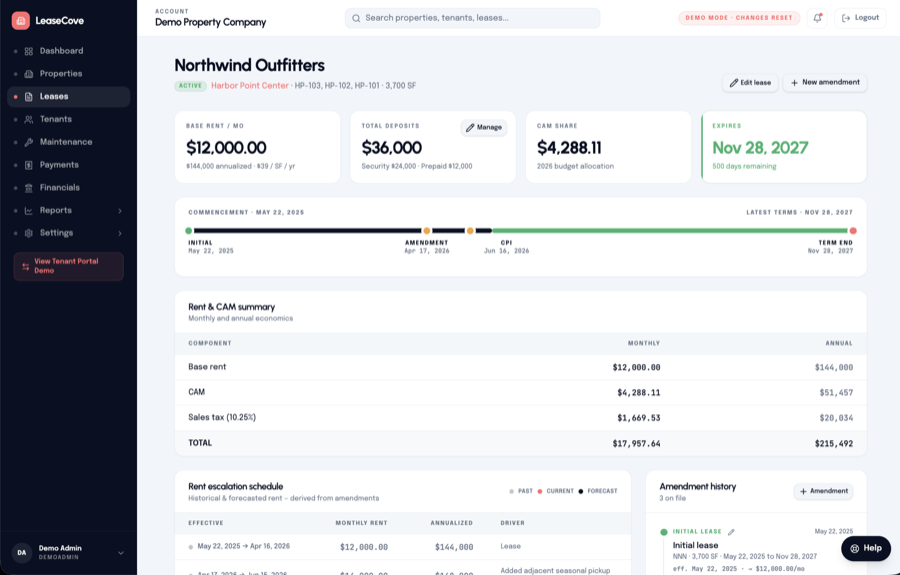
app.leasecove.com / lease
LeaseCove lease dashboard showing rent, CAM, lease timeline, and amendment history

Built for commercial property owners and managers

Customer story

Anonymized Florida-based commercial owner-operator · 10 office and warehouse properties totaling 100,000 square feet

From spreadsheet risk to clearer commercial operations.

Lease terms, CAM information, renewals, and reporting once lived across multiple spreadsheets. LeaseCove brought lease, tenant, and CAM data into one workspace—giving the team a clearer view of rent rolls, amendments, CAM recovery, and collections.

The tenant portal and maintenance workflows also replaced scattered email, helping reduce errors that had put CAM recovery and rent collection at risk.

“We found an error in our spreadsheets where we were not correctly collecting $10k in CAM reconciliation charges. LeaseCove helped us spot this error just in time for end-of-year true up.”

President · Anonymized Florida commercial owner-operator
Portfolio Dashboard

Your whole portfolio, in one view.

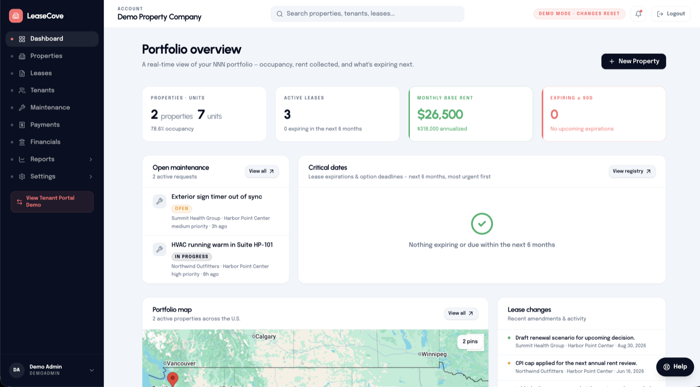
See occupancy, active leases, monthly rent, critical dates, maintenance, portfolio geography, and recent lease changes in one operational view.

  • Portfolio-wide occupancy and lease metrics
  • Critical dates and maintenance at a glance
  • Map and recent lease activity in context
app.leasecove.com / portfolio
LeaseCove portfolio dashboard showing occupancy, active leases, financial metrics, critical dates, maintenance, and a portfolio map

Complete commercial property platform

Every commercial workflow, connected.

LeaseCove brings portfolio operations, lease administration, CAM recovery, financial reporting, tenant service, and data migration into one clear workspace.

Portfolio & property operations

See what is occupied, what is due, and what needs action across every property.

  • Portfolio dashboard with occupancy and rent metrics
  • Property, building, suite, and unit records
  • Portfolio map with property-level drill-down
  • Critical dates, expirations, and upcoming actions
  • Lease activity and maintenance visibility
  • Multiple business entities and organizations
Explore portfolio visibility

Lease administration

Keep every commercial lease term, change, and supporting record connected.

  • Lease and tenant records in one workspace
  • Base rent, CAM share, and key economics
  • Rent schedules and automatic escalations
  • Amendments with audit-oriented history
  • Renewal options, expirations, and term changes
  • Security deposits and lease documents
Explore lease management

CAM recovery

Move from annual budgets to tenant-ready reconciliation with the right lease context.

  • Annual CAM budgets and actual expenses
  • Unit-level applicability and exclusions
  • Expense allocation and recovery detail
  • Budget-versus-actual variance review
  • Property and year-based reconciliation
  • Tenant CAM statements and CSV exports
Explore CAM reconciliation

Reporting & financial visibility

Turn lease and accounting information into portfolio-level reporting without manual assembly.

  • Portfolio and property rent rolls
  • Property rate sheets
  • Consolidated P&L across business entities
  • Annual pro forma reporting
  • Balance sheet and cash-flow rollups
  • Entity detail and intercompany reporting
Explore financial reporting

Tenant & maintenance operations

Give tenants self-service visibility while your team keeps requests and follow-up organized.

  • Tenant dashboard and lease access
  • Payment-status and billing visibility
  • CAM statements and deposit summaries
  • Maintenance request submission
  • Priority, status, and activity tracking
  • Multiple users per tenant organization
Explore the tenant portal

Data, teams & controls

Bring existing records in carefully, then give each person access to the right workflows.

  • Review-first import from Excel files
  • AI-assisted lease-document extraction
  • Mapped-field review before import
  • Flagged inconsistencies and exceptions
  • Role-scoped access and team invitations
  • Company, organization, and user settings
Explore spreadsheet migration
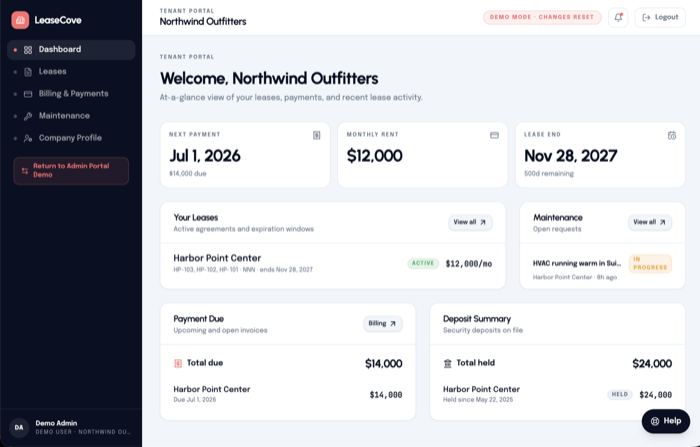
app.leasecove.com / tenant
LeaseCove tenant portal showing welcome, payments, leases, maintenance, and deposit summary
Tenant Portal

Give tenants a portal they'll actually use.

Tenants log in to view their lease, payment status, file maintenance requests, and review CAM statements — without back-and-forth email. You get fewer calls and a clear paper trail.

  • Live rent & payment status
  • Self-serve maintenance requests and status
  • Lease docs, deposits & CAM history
  • Multiple users per tenant org
Reports Suite

Financial reports that close themselves.

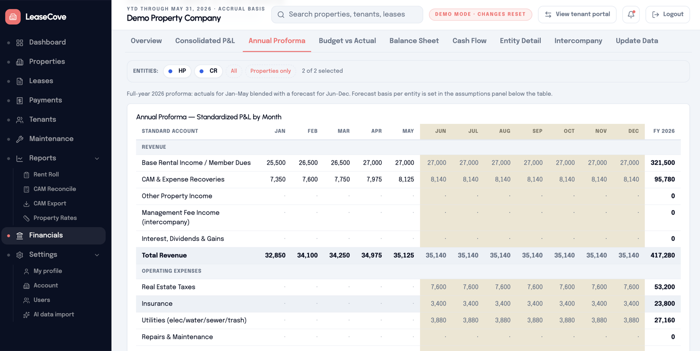
Rent roll, CAM reconciliation, property rate sheets, and exportable YTD and year-end statements. Run a report, share a CSV, get back to managing properties.

  • Consolidated Financial Statement Rollups
  • CAM reconcile · budget vs actual variance
  • Rent roll snapshots by property or portfolio
  • Property rate sheets for tenant prospecting
  • One-click CSV report exports
app.leasecove.com / financials
LeaseCove annual proforma financial report showing standardized P&L by month with forecast columns and FY 2026 totals
AI Importer

Move beyond spreadsheets without re-keying everything.

Upload your existing Excel files, review mapped fields and flagged inconsistencies, then bring approved properties, tenants, leases, and CAM data into one workspace.

See the importer in action

01

Upload existing records

Start with the Excel files behind your properties, tenants, leases, and CAM workflows.

02

Review mapped fields

LeaseCove matches columns and flags inconsistencies for your team to review.

03

Approve and begin

Confirm the import before approved records become part of your operating workspace.

Simple pricing

Plans that scale with your portfolio.

Every plan includes a 30-day free trial — no credit card required.

Starter

For small portfolios getting started

$29/mo
  • Up to 25 units
  • Lease & tenant management
  • CAM budgeting & reconcile
  • Amendment tracking
  • Tenant portal & maintenance
  • AI spreadsheet importer
  • Email support
Start free trial
Most Popular

Enterprise

For growing property management firms

$29 + $0.50/unit/mo
  • More than 25 units
  • Everything in Starter
  • Financial reports suite
  • Team roles & permissions
  • Priority email support
Start free trial

Custom

For businesses needing custom options

Varies
  • Unlimited properties
  • Everything in Enterprise
  • Custom reports & fields
  • Custom integrations
  • Dedicated success manager
Contact us

Common questions

Lease & property management FAQ

What is LeaseCove used for?+

LeaseCove is purpose-built software for managing leases, tenants, and properties — CAM reconciliation, amendments, financial reports, maintenance, and a tenant portal, all in one place.

Does it replace my lease spreadsheets?+

It can. Upload your spreadsheet, review mapped fields and flagged inconsistencies, then begin managing your commercial lease and CAM data in one workspace.

Can tenants log in too?+

Yes. The Tenant Portal lets each tenant view leases, payment status, maintenance requests, and CAM statements — saving you back-and-forth email.

What financial reports are included?+

Rent roll, CAM reconcile (budget vs. actual), property rate sheets, and exportable year-end CAM statements. Everything is one-click CSV exportable.

Does LeaseCove replace QuickBooks?+

No. LeaseCove is designed to work alongside your existing accounting software, including QuickBooks. It provides consolidated reporting across multiple business entities using profit-and-loss, balance-sheet, and cash-flow information from your accounting system.

Who is LeaseCove built for?+

Small to mid-size commercial property managers — typically 5 to 500 units across retail, medical office, industrial, and mixed-use.

Is LeaseCove for commercial or residential property management?+

LeaseCove is optimized for commercial property teams managing triple-net leases, tenants, CAM, amendments, and reporting. It can support residential portfolios, but commercial workflows are its primary focus.

Get in touch

Tell Us About Your Portfolio

Whether you need a demo, pricing details, or migration help, our team will follow up quickly.

Response within 1 business dayNo pressure, just helpful answers

Ready to leave the spreadsheet behind?

Join property managers who've switched from Excel chaos to LeaseCove's streamlined platform for leases, tenants, and properties. Start free, no credit card required.